The most autonomous AI agent for images and video.
Prism is a long-running agent for images and video, built like Claude Code. It selects the skills, plans every scene and writes each prompt for its model. Then it runs, checks and fixes the results while you're away.
How Prism works
01Describe it
You describe an ad for your serum, a 30-second drama episode or a creator talking about your app. You can add a product link or photos.
02Prism selects the skills
Prism reads the request and loads the skills that fit, such as UGC, short drama, character sheets, camera moves and color grades. Use / to see the skills dropdown.
03It plans every scene
The plan lists each step with its model, prompt and price. You can read it before anything runs.
04It writes the prompts
Prism turns your request into a detailed prompt for each model, in the format that model responds to best.
05It runs, checks and fixes
Prism checks every result. It redoes any step with the wrong face, a mangled hand or garbled text. We refund failed renders.
06It keeps going while you’re away
Videos can take several minutes to finish. Prism starts the renders and wakes up when they finish. It checks them, continues the plan and tells you what it did.
Plan mode for images and video
a 10-second 3D cartoon fight: a roman soldier vs a ninja, in a stormy colonnade
- 1
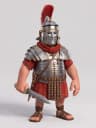 DoneThe Roman soldierNano Banana 2 · 7 credits
 - 2
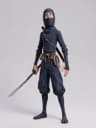 DoneThe ninjaNano Banana 2 · 7 credits
 - 3
 DoneThe stormy colonnadeNano Banana 2 · 7 credits
 - 410sReadyThe fightSeedance 2.5 · 462 credits
3D cartoon. A short, stocky Roman soldier fights a tall, thin ninja in a marble colonnade at night, during a storm. One continuous shot, no cuts.

[Image1] is the Roman soldier: his helmet, crest, armour and sword.
[Image2] is the ninja: his mask, suit and katana.
[Image3] is the colonnade: the columns, banners and fire bowls, with rain falling outside.

0-3s: The soldier and the ninja face each other between two columns. Camera: Low angle, moving slowly toward them.
3-7s: CONTINUE SAME SHOT. The ninja jumps over the soldier's sword and lands behind him. The soldier turns around. Camera: The camera moves around them.
7-10s: CONTINUE SAME SHOT. The soldier knocks the katana out of the ninja's hand. It falls into a fire bowl and sparks fly up. Camera: The camera stops close on the ninja's face.

Keep both characters' faces and costumes the same throughout.

SOUND: Thunder, rain, swords hitting, feet on stone, the fire crackling.
EXCLUDE: Cuts, hidden cuts, text, subtitles, extra fingers, morphing.
Up to 20 steps
Each step shows what it makes, the model, the full prompt and the credit cost. Plan mode runs nothing until you press Run.
Connected steps
A character sheet feeds every shot of that character. A set feeds every scene shot there. Prism makes and checks the images before it makes any video.
Step-by-step runs
You can make the characters, check them, then make the video. You can regenerate one step and keep the rest. Cancelling a plan refunds the steps that haven’t started.
Three modes
Auto plans and runs, up to 500 credits a message. Ask plans, then checks with you before spending. Plan only plans, and you press Run.
What Prism knows about each model
Timed scripts for Seedance 2.5
Prism writes each Seedance 2.5 clip as a timed script: the scene, a line per reference, the beats by the second, what stays the same, the sound and what to exclude. It uses plain words, because Seedance draws exactly what the words say.
Consistent characters
Prism makes a recurring character once as a reference sheet and passes it to every shot. The face, hair and clothes stay the same from the first shot to the last.
Start frames and references
Some models want a start frame, some want reference images, and some fail when they get both. Prism checks every step against what its model accepts before it spends a credit.
Exclusion lines
Every Seedance prompt ends with an exclusion line that lists cuts, on-screen text, subtitles, extra fingers and morphing. The line rules out the usual failures before the model renders.
Realistic people
Prism shoots UGC and testimonials like a phone camera: real skin, real rooms, real light. Some models refuse photos of real people, so Prism describes them in words.
The right model for each shot
Prism weighs length, people on screen, vertical framing, sound, on-screen text and price to pick a model for each step. You can also pick the model, and Prism writes for it.
22 skills, and more every week
Real people
- UGC and testimonials
- Hyper-realistic, phone-shot people
- NYC street style, men and women
Story
- Short drama episodes
- Character sheets
- Building a scene that matches shot to shot
Camera and look
- Cinematography: light and composition
- 10 everyday camera shots
- 10 signature moves, like dolly zoom and bullet time
- 21 color grades
- 7 illustrated looks, from red noir to crayon
Models and motion
- Choosing the model for each shot
- Seedance 2.5 scripts
- Seedance 2.5 edits: restyle, swap, extend
- Motion design: kinetic type, UI and charts
Every state-of-the-art model
Video
- Seedance 2.5
- Seedance 2.0
- Seedance 1 Pro
- Veo 3.1
- Veo 3.1 Fast
- Veo 3.1 Lite
- Veo 3 Fast
- Gemini Omni 1.1
- Sora 2
- Sora 2 Pro
- Kling v3
- Kling v3 Omni
- Kling v2.1
- Kling Motion Control
- MiniMax H3 Max Turbo
- LTX-2 Pro
- Wan 2.2
- Pixverse Lipsync
Image
- GPT Image 2
- GPT Image 1.5
- Nano Banana 2
- Nano Banana 2 Lite
- Nano Banana
- Imagen 4
- Seedream 4
- Flux Dev
Voice and sound
- ElevenLabs Multilingual v2
- ElevenLabs Turbo v2.5
- ElevenLabs Voice Changer
- ElevenLabs Sound Effects
- Voice cloning
Fix anything in the browser
Video editor
- Trim, split and reorder clips on a multi-track timeline
- Freeze frames, speed and volume
- Change a voice, or add a voiceover, with ElevenLabs
- Captions from the audio
- Object tracking for labels and blurs
- Position and opacity keyframes
- Export MP4 at up to 4K
Image editor
- Edit an image with a prompt
- Remove a background in one click
- Crop, mask and filters
- Text in 80+ fonts, shapes and drawing
- Layers, and several frames on one board
- Export PNG at up to 4K
Credits at cost
- 1¢
- One credit is one cent of what the model costs us.
- No markup
- Generations cost what the model costs. We pass on better rates we negotiate.
- Every model
- Every plan includes every model, with no rate limits.
What you can make
Describe the product, the length and where the ad will run. Prism plans the shots, makes them and checks each one. You get a finished video ad, ready to edit or post.
Prism makes testimonials, unboxings and talking-to-camera TikToks that look like a real customer filmed them. The AI ad maker starts from your product page.
Make 30-second vertical episodes for ReelShort-style series in Prism. Each episode opens with a hook in the first two seconds and ends on a cliffhanger.
Pick red noir, retro pop print, crayon figures, deadpan portraits or one of 21 color grades. Prism keeps the look across every shot of a reel.
Prism builds kinetic type, product UI walkthroughs and animated charts as code, so every frame is sharp. See AI motion design.
You can keep a shot and change what happens after 0:04. You can also swap the person or the product, change the style or extend the clip in Prism.
Frequently asked questions
What is Prism?+
Prism is Planegraph's long-running AI agent for images and video, built like Claude Code and Codex. You describe an ad, a UGC video, a short drama episode or a motion graphic in one message. Prism loads the skills that fit, plans every scene, writes a detailed prompt for each model, runs the generations, checks the results and redoes what failed. It suits specialists and first-timers alike.
What is Plan mode in Prism?+
Plan mode makes Prism draft the whole job before it spends anything. A plan has up to 20 steps, and each step shows its model, its full prompt and its credit cost. You can run the whole plan or one step at a time. For example, you can make a character, check it, then make the video. You can also regenerate any single step. Prism has three modes: Auto plans and runs up to 500 credits per message, Ask plans and asks before spending, and Plan only plans until you press Run.
How is Prism different from using Seedance or Veo directly?+
Prism runs the same models and writes the prompts for you, using what we have learned from our own experiments, our early testers and the community. Seedance 2.5 gets a plain, timed script with sound and an exclusion line. A recurring character gets a reference sheet first. Each model gets start frames or reference images in the form it accepts. Prism turns a one-line idea into a production-ready prompt and checks every result. You pay the same credits the model costs.
How is Prism different from ChatGPT or Claude?+
ChatGPT and Claude can write a video prompt. You then paste it into each model, wait, check the result and fix it yourself. Prism does the whole loop: it writes model-specific prompts, runs them on Seedance 2.5, Veo 3.1, GPT Image 2 and Nano Banana 2, checks every result, redoes what failed and hands you finished media you can edit in the browser.
Which models does Prism use?+
Prism directs Seedance 2.5, Veo 3.1 Fast, Gemini Omni 1.1 and MiniMax H3 Max Turbo for video, and GPT Image 2, GPT Image 1.5 and Nano Banana 2 for images. It picks one for each step, or uses the model you set. The rest of Planegraph adds Kling v3, Sora 2, Veo 3.1, LTX-2 Pro, Wan 2.2, Imagen 4, Seedream 4, Flux and ElevenLabs voices and sound effects, among others.
What skills does Prism have?+
Prism has 22 skills: UGC, hyper-realistic people, NYC street style for men and for women, short drama, character sheets, building a scene, cinematography, everyday camera shots, signature camera moves, color grading, choosing a model, Seedance 2.5 scripts, Seedance 2.5 edits, motion design and seven illustrated looks. Prism loads them itself when a request needs them. You can also use / in the composer to see the skills dropdown. We add new skills every week.
Where do Prism’s best practices come from?+
We run our own experiments with each model to learn what it responds to, such as when it needs a start frame and what to exclude. We also source best practices from our early testers and collect the best of what the community publishes. We turn all of it into skills, and Prism loads them when a request needs them.
Can I edit what Prism makes?+
Yes. Everything Prism makes opens in Planegraph's video editor and image editor. The video editor lets you trim, split or cut a scene a model got wrong, change a voice or add a voiceover with ElevenLabs, add captions and export MP4. The image editor lets you edit with a prompt, remove a background, crop, add text and export PNG. Both run in the browser, with nothing to download.
Does Planegraph mark up credits?+
No. One credit is one cent of what the model costs us, and generations carry no markup. A credit on Planegraph buys as much model time as a cent does at the provider. We pass on better rates we negotiate with providers. Paid plans include monthly credits and Prism messages, and every plan includes every model with no rate limits.
Is Prism for professionals or beginners?+
Both. Specialists get an agent that knows each model’s quirks, shows its prompts in Plan mode and runs long multi-step jobs. People new to AI video can type one sentence and get a finished result without learning any prompt tricks.
Can Prism keep a character the same across shots?+
Yes. Prism makes a recurring character once as a reference sheet and passes it to every shot they appear in. Their face, hair and clothes stay the same from the first shot to the last, from any angle. You can build a multi-shot ad or a short drama series around one character.
Is Prism free?+
Free accounts can send Prism 1 message a month to try it. Paid plans get 100 to 250 messages a month, shared with the Workflow and Editor assistants, plus monthly credits for the images and videos it makes.